
India Post Speed Post Guide
How to Track Your India Post Parcel इंडिया पोस्ट पार्सल कैसे ट्रैक करें?
Follow this straightforward step-by-step guide to locate your tracking number, check sorting hub scans, and understand delivery timelines. अपने पार्सल की सटीक लोकेशन जानने, ट्रैकिंग नंबर ढूंढने और डिलीवरी स्टेटस को समझने के लिए इस आसान गाइड का पालन करें।
1
Find Tracking ID on iFuture ifuturetech.org पर ट्रैकिंग आईडी ढूंढें
- Log in to your account on ifuturetech.org.
- Go to My Account and click on the Orders tab.
- Click the Order Number you wish to track.
- If you see a “Yet to ship” date, the order will be dispatched on or before that scheduled date.
- Once dispatched, copy the 13-digit tracking number (e.g.
EJ123456789IN).
- सबसे पहले वेबसाइट ifuturetech.org पर लॉगिन करें।
- My Account में जाकर Orders टैब पर क्लिक करें।
- उस ऑर्डर नंबर को चुनें जिसे आप ट्रैक करना चाहते हैं।
- अगर वहां “Yet to ship” की तारीख दिखती है, तो पार्सल उस तारीख तक रवाना किया जाएगा।
- शिप होने के बाद 13 अंकों का ट्रैकिंग नंबर कॉपी करें।
2
Open India Post Portal आधिकारिक पोर्टल पर जाएं
- Visit the official India Post tracking portal.
- Look for the Track N Trace box.
- Enter your Consignment Number (Tracking ID).
- Enter the security captcha and click Search.
- इंडिया पोस्ट की आधिकारिक वेबसाइट पर जाएं।
- वहां Track N Trace बॉक्स खोजें।
- अपना कन्साइनमेंट / ट्रैकिंग नंबर दर्ज करें।
- कैप्चा कोड भरें और Search बटन दबाएं।
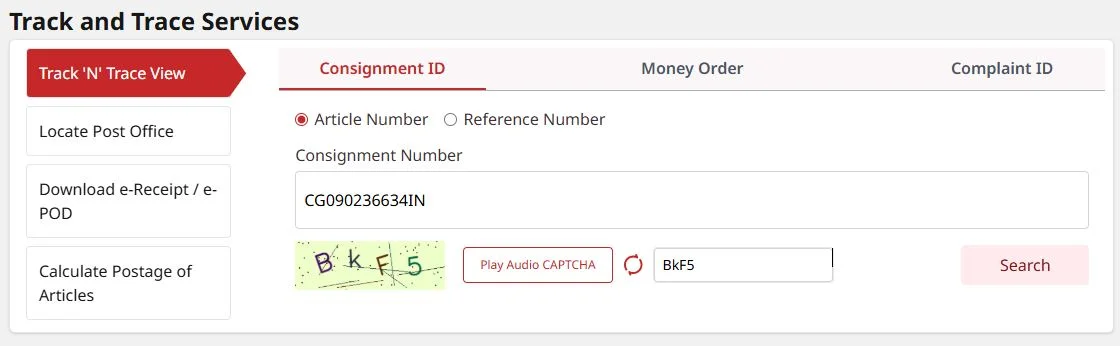
Track N Trace search box on India Post
इंडिया पोस्ट पोर्टल पर Track N Trace बॉक्स
3
Understand Result Window रिजल्ट विंडो को समझें
- Status Bar: Displays whether parcel is Booked, In Transit, or Delivered.
- Booked At/On: Shows dispatch post office and date.
- Destination: Shows the delivery post office serving your pincode.
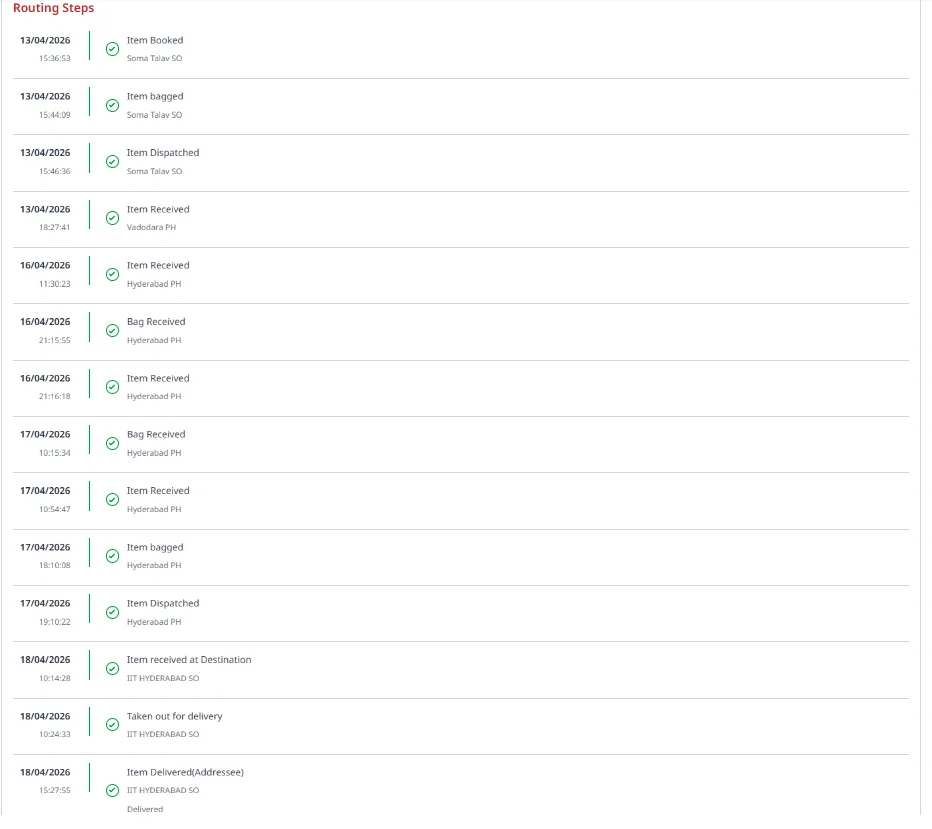
- Routing Steps: Lists timestamped scans at regional parcel hubs.
- Status Bar: दिखाता है कि पार्सल Booked, In Transit, या Delivered है।
- Booked At/On: बुकिंग का मूल पोस्ट ऑफिस और तारीख।
- Destination: आपके पिनकोड का अंतिम डिलीवरी पोस्ट ऑफिस।
- Routing Steps: विभिन्न हब (Sorting Hubs) पर पार्सल स्कैन की सूची।
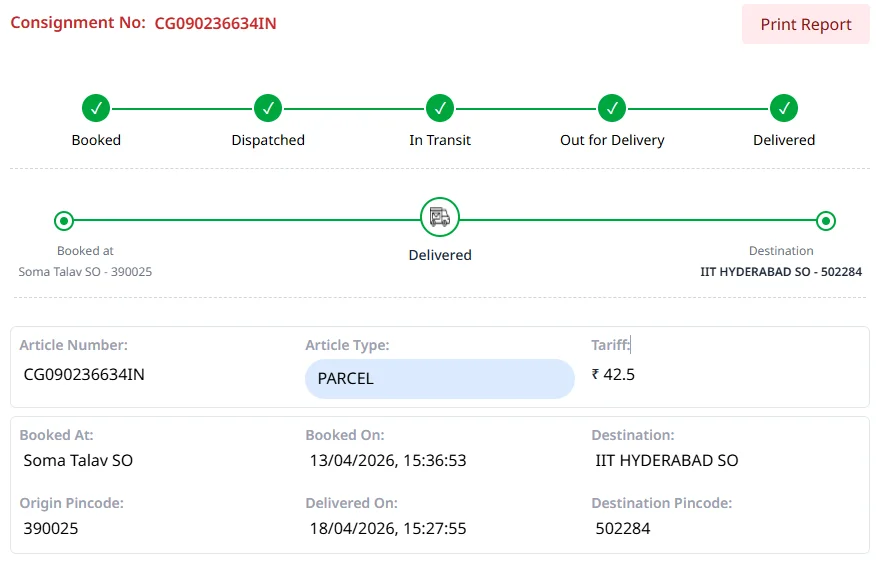
Official India Post Consignment Details
इंडिया पोस्ट कन्साइनमेंट रिजल्ट विंडो
4
Delivery & Support डिलीवरी और सहायता
- When status shows Out for Delivery, your local postman has the parcel for final delivery.
- Keep your phone active for OTP/signature requirements.
- Need assistance? Contact our team with your order number.
- जब स्टेटस Out for Delivery दिखे, तो डाकिया पार्सल लेकर निकल चुका है।
- कृपया अपना फोन चालू रखें ताकि डिलीवरी में रुकावट न आए।
- कोई समस्या होने पर अपने ऑर्डर नंबर के साथ हमारी सहायता टीम से संपर्क करें।
Status Indicator & Routing Lifecycle पार्सल स्टेटस और राउटिंग की जानकारी
● Booked / Item Booked
● Item Dispatched
● Item Received at Hub
● Out for Delivery
● Item Delivered
Item Received (Hubs)
The parcel reached a major regional sorting center (e.g. Vadodara PH, Delhi NSH, Hyderabad PH).
पार्सल किसी मुख्य सॉर्टिंग सेंटर (जैसे वडोदरा PH या दिल्ली NSH) पहुँच गया है।
Item Dispatched
The parcel has departed the sorting facility and is traveling to the destination hub or local sub-post office.
पार्सल हब से अगले स्टेशन या आपके नजदीकी पोस्ट ऑफिस के लिए निकल चुका है।
Out for Delivery
The parcel is handed to the area postman and will arrive at your address during regular postal delivery hours.
पार्सल स्थानीय पोस्टमैन को सौंप दिया गया है और आज आपके पते पर पहुंचेगा।
Real Example: Timestamped Parcel Movement & Sorting Scans
वास्तविक उदाहरण: पार्सल मूवमेंट एवं सॉर्टिंग हब स्कैन तालिका
Frequently Encountered Tracking Queries अक्सर पूछे जाने वाले सवाल एवं समाधान
Tracking Shows “No Record Found”? “No Record Found” दिख रहा है?
- Processing Time: India Post servers usually take 24–48 hours to register tracking scans after booking.
- Scheduled Shipping: Please refer to your estimated dispatch date on the order page.
- SMS Notice: India Post sends automatic booking confirmation via SMS once scanned.
- सिस्टम अपडेट: बुकिंग के बाद इंडिया पोस्ट पोर्टल पर डेटा दिखने में 24-48 घंटे लग सकते हैं।
- शिपिंग तारीख: कृपया अपने ऑर्डर पेज पर दी गई अनुमानित शिपिंग तिथि देखें।
- एसएमएस: पार्सल स्कैन होने पर इंडिया पोस्ट सीधे आपके फोन पर एसएमएस भेजता है।
Status Has Not Updated For Days? पार्सल स्टेटस कई दिनों से अपडेट नहीं हुआ?
- Long Haul Transit: Scans only occur when the parcel reaches an intermediate major sorting hub.
- Interstate Distance: Between distant state capitals, parcels typically travel 3–5 days without intermediate scans.
- Next Scan: It will immediately update as soon as it is scanned at the destination sorting facility.
- ट्रांजिट समय: ट्रैकिंग केवल बड़े सॉर्टिंग हब पर स्कैन होने पर ही अपडेट होती है।
- दूरी: एक राज्य से दूसरे राज्य जाने में 3 से 5 दिन लग सकते हैं, इस दौरान नया स्कैन नहीं दिखता।
- निश्चिंत रहें: अगले हब पर पहुंचते ही स्टेटस अपने आप अपडेट हो जाएगा।
Shows “Delivered” But Not Received? “Delivered” दिखा रहा है पर मिला नहीं?
- Check with Household / Guard: Postmen often hand parcels to family members or building security.
- End of Shift Scan: Occasionally a postman marks delivery at end of duty and delivers physically the next morning.
- Next Step: Allow 24 hours. If unreceived, visit your local post office with your 13-digit tracking number.
- परिवार या गार्ड से पूछें: अक्सर आपके न होने पर डाकिया पार्सल परिवार के सदस्य या सिक्योरिटी गार्ड को दे देता है।
- शिफ्ट समाप्ति स्कैन: कई बार डाकिया शाम को ‘Delivered’ मार्क कर देता है और अगली सुबह पार्सल देता है।
- अगला कदम: 24 घंटे इंतज़ार करें। न मिलने पर ट्रैकिंग आईडी लेकर अपने नजदीकी डाकघर से संपर्क करें।